Web Animation
Animation on a web page is any form of movement of objects or images. Animations are usually done in Adobe Flash, although Java and GIF animations are also used in many websites. Streaming video in Flash is coming increasingly popular.
Reasons to have motion on a web page are to draw attention to something, to provide a demonstration or to entertain. The need for movement on a page depends on the purpose and content of the page. A financial institute would not really need animations on their pages, while an entertainment site obviously would have such movement.
Web animation is used through;
· Banner ads Banner adds are advertisements that are placed on web pages. When clicked on by the web user, the banner add it takes the user to a web site to give the user more information about the product advertised.The advertisement is constructed from an image, GIF, Flash, often employing animation, sound, or video to maximize presence.
· Promotion - Promotional advertising is when companies ect. create an animation to promote their product.
· Information - Animations can be created for the web to give information to internet users.
· Entertainment - Animations for entertainment can be found on the internet. These can be found on video streaming websites like YouTube.
But how did aniamtion start? When was it invented and how did it get to this sort of web animation? And most importantly, what is animation?
In this section of the article, it will be exploring this.
Animation is an illusion that is created by quickly cycling through a series of images, each slightly different from the last. The brain perceives the group of images as a single changing scene. In film, this illusion is created by using cameras that record many photographs, or frames, each second. When the frames are played back by a projector, the audience sees a moving picture.We see animations due to what is called “Persistance of vision”. "Persistence of Vision" refers to the phenomenon where the retina retains an image for a brief split-second after the image was actually seen, and lends itself to animation by fostering the illusion of motion when we view images in closely-timed sequence to one another. We don't notice the fractional skips between images because that persistence fills in the momentary gap to make the motion seem seamless. So persistence of vision is a optical illusion, so we don’t notice the skip and instead see it as if it’s actually happening.
Animation has come a long way since its start in 1824, when Peter Roget presented his paper 'The persistence of vision with regard to moving objects' to the British Royal Society.
And today animation is used almost everywhere.
Animation began with devices. Some of these devices were;
1831
Belgian scientist Dr. Joseph Antoine Plateau and Dr. Simon Rittrer constructed a machine called a phenakistoscope.

1868
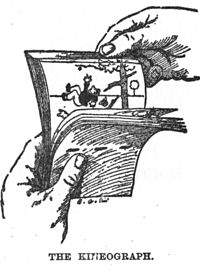
The first flip book appeared in September, 1868, when it was patented by John Barnes Linnett under the name kineograph, or moving picture. They were the first form of animation to employ a linear sequence of images rather than circular as in the older phenakistoscop.
1889
Thomas Edison announced his creation of the kinetoscope which projected a 50ft length of film in approximately 13 seconds.

But then came the creation of the projector;
1892
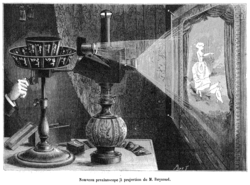
Emile Renynaud, combining his earlier invention of the praxinoscope with a projector, opens the Theatre Optique in the Musee Grevin. It displays an animation of images painted on long strips of celluloid.

1895
Louis and Augustine Lumiere issued a patent for a device called a cinematograph capable of projecting moving pictures.

1896
Thomas Armat designed the vitascope which projected the films of Thomas Edison. This machine had a major influence on all sub-sequent projectors.

Then animators stared to use cameras to capture animations that they would draw. This is known as stop motion animation, and is still widely used today. Then animators stared to use cameras to capture animations that they would draw.
This is known as stop motion animation, and is still widely used today.
Stop-motion animation is used to describe animation created by physically manipulating real-world objects and photographing them one frame of film at a time to create the illusion of movement. There are many different types of stop-motion animation, usually named after the medium used to create the animation. Computer software is widely available to create this type of animation. Traditionally a movie film camera was started and stopped, one frame at a time.
While the camera was stopped an animator would adjust the figure or object the camera was pointing at. The camera would film another frame - this would continue until all the animation was filmed.
This is known as stop motion animation, and is still widely used today.
Stop-motion animation is used to describe animation created by physically manipulating real-world objects and photographing them one frame of film at a time to create the illusion of movement. There are many different types of stop-motion animation, usually named after the medium used to create the animation. Computer software is widely available to create this type of animation. Traditionally a movie film camera was started and stopped, one frame at a time.
While the camera was stopped an animator would adjust the figure or object the camera was pointing at. The camera would film another frame - this would continue until all the animation was filmed.
1906


1908
In France Emile Cohl produced a film, Phantasmagorie which was the first depicting white figures on a black background.
One of the many examples of stop motion animation is Claymation.
1908
Clay-animated films were produced in the United States as early as 1908, when Edison Manufacturing released a trick film entitled The Sculptor's Welsh Rarebit Dream.Each animated piece, either character or background, is "deformable"—made of a malleable substance, usually plasticine, clay.
1910
Emile Cohl makes En Route the first paper cutout animation. This technique saves time by not having to redraw each new cell, only reposition the paper.
Animations became more advanced, and now animators used a series of drawn pictures to produce an animation;
1911
Winsor McCay produced an animation sequence using his comic strip character "Little Nemo."
1914
Winsor McCay produced a cartoon called "Gertie, The Trained Dinosaur" which amazingly consisted of 10,000 drawings.
Then came the creation of cell animation;
1914
Earl Hurd applies for a patent for the technique of drawing the animated portion of an animation on a clear celluloid sheet and later photographing it with its matching background. This is known as Cel animation.
1915
J.R. Bray devised "Colonel Heeza Liar". It was the first cartoon series to feature a recurring animated star.
The International Feature Syndicate released many titles including "Silk Hat Harry","Bringing Up Father", and "Krazy Kat".
1919
Pat Sullivan created an American cartoon "Felix the Cat."
1923
Walt and Roy Disney found Disney Brothers Cartoon Studio.
1923
Walt Disney extended Max Fleischer's technique of combining live action with cartoon characters in the film "Alice's Wonderland".
Warner Brothers released "The Jazz Singer" which introduced combined sound and images.
1928
Walt Disney created the first cartoon with synchronized sound called "Steam Boat Willy".

1930
The King of Jazz is produced by Universal. In it is a short animated sequence done by Walter Lantz. It is the first animation done with the two strip technicolor process.
1934
Urb Irwek creates a multi-plane camera. This camera is capable of filming several separate layers of cels giving the final frame a truly three dimensional look.

1943
John and James Whitney produced "Five Abstract Film Exercises." These films are visually based on modernist composition theory, the carefully varied permutations of form are manipulated with cut-out masks so that the image photographed is pure direct light shaped, rather than the light reflected from drawings as in traditional animation.
1945
Harry Smith produced animation by drawing directly onto film.
1957
John Whitney used 17 Bodine motors, 8 Selsyns, 9 different gear units and 5 ball integrators to create analog computer graphics.
Computer generated animations.
Computer animation is the process of using a computer graphics to generate animated images. Computer animation
Computer animation is the process of using a computer graphics to generate animated images. Computer animation
Computer animation first developed in 1964 by Ken Knowlton. He started developing computer techniques for producing animated movies, but it wasn't until 1972, in the University of Utah, Fred Parke created the first computer generated facial animation.
So persistence of vision is a optical illusion, so we don’t notice the skip and instead see it as if it’s actually happening.
In digital animation there are different file formats, raster and vector.
Raster and vector animations work the same as raster and vector images.
Raster images, also known as Bit map images are a way to represent digital images. A raster image represents an image in a series of bits of information which translate into pixels on the screen. These pixels form points of colour which create an overall finished image.
When a raster image is created, the image on the screen is converted into pixels. Each pixel assigned a specific value which determines its colour.
This is the same with animation, because the the frame by frame images are made up of pixels which make up the full image.
The raster image takes a wide variety of formats, such as;
Bmp – a BMP image, also known as a bitmap image file, is a raster graphics image file format that is used to store digital images. BMP images use no compression.
JPEG - A JPEG, or Joint Photographic Experts Group, is commonly used for storing digital photos since the format supports up to 24-bit colour.
The degree of compression can be adjusted, allowing a selectable trade-off between storage size and image quality. JPEG has a lossy compression, which means it can compress files so that they are smaller, but the files loose some colour and information.JPEG typically achieves 10:1 compression with little perceptible loss in image quality.
PNG - The PNG, or Portable Network Graphics, file format supports true colour which is 16 million colours. The PNG file excels when the image has large, uniformly coloured areas. The lossless PNG format is best suited for editing pictures. Indexed-colour, grayscale, and true colour images are supported, plus an optional alpha channel. PNG is designed to work well in online viewing applications like web browsers so it is fully stream able with a progressive display option. It is robust, meaning it provides both full file integrity checking and simple detection of common transmission errors.
GIF – GIF, or Graphics Interchange Format, is limited to an 8-bit palette, or 256 colours. This makes the GIF format suitable for storing graphics with relatively few colours such as simple diagrams, shapes, logos and cartoon style images. The GIF format supports animation and is still widely used to provide image animation effects. It also uses a lossless compression that is more effective when large areas have a single colour, and ineffective for detailed images or dithered images
TIFF - The TIFF, or Tagged Image File Format, is a flexible format that normally saves 8 bits or 16 bits per colour for 24-bit and 48-bit totals, usually using either the TIFF or TIF filename extension. TIFF's flexibility can be both an advantage and disadvantage, since a reader that reads every type of TIFF file does not exist. It can be lossy and lossless as some offer relatively good lossless compression for bi-level, black and white, images.
PNG - The PNG, or Portable Network Graphics, file format supports true colour which is 16 million colours. The PNG file excels when the image has large, uniformly coloured areas. The lossless PNG format is best suited for editing pictures. Indexed-colour, grayscale, and true colour images are supported, plus an optional alpha channel. PNG is designed to work well in online viewing applications like web browsers so it is fully stream able with a progressive display option. It is robust, meaning it provides both full file integrity checking and simple detection of common transmission errors.
GIF – GIF, or Graphics Interchange Format, is limited to an 8-bit palette, or 256 colours. This makes the GIF format suitable for storing graphics with relatively few colours such as simple diagrams, shapes, logos and cartoon style images. The GIF format supports animation and is still widely used to provide image animation effects. It also uses a lossless compression that is more effective when large areas have a single colour, and ineffective for detailed images or dithered images
TIFF - The TIFF, or Tagged Image File Format, is a flexible format that normally saves 8 bits or 16 bits per colour for 24-bit and 48-bit totals, usually using either the TIFF or TIF filename extension. TIFF's flexibility can be both an advantage and disadvantage, since a reader that reads every type of TIFF file does not exist. It can be lossy and lossless as some offer relatively good lossless compression for bi-level, black and white, images.
As with raster animations, vector animations work the same as vector images.
Vector graphics is based on images made up of vectors which lead through locations called control points. Each of these points has a definite position on the x and y axes of the work plan. Each point is a variety of database, including the location of the point in the work space and the direction of the vector. Each track can be assigned a colour, a shape, a thickness and also a fill. This does not affect the size of the files in a substantial way because all information resides in the structure.
Vector images can be resized to any size, and the image will still remain clear, unlike raster images where the image would become pixelated if it’s resized big enough.
Vector images can have fake cartoon look. This is due to the fact that they are unable to depict the continuous subtle tones of a photograph.
But what are the different softwere that animation use?
There are many different software for digital animation. Some examples of these sofwear are;
QuickTime
QuickTime is built into the Macintosh operating system and is used by most Mac applications that include video or animation. PC’s can also run files in QuickTime format but they require a special QuickTime driver. QuickTime supports most encoding formats including Cinepac, JPEG, and MPEG. QuickTime is competing with a number of other standards including AVI and ActiveMovie.
In Feb 1998, the ISO standards body decided to use QuickTIme as the basis for the new MPEG-4 standard. MPEG (.mpg, .mpeg, .mpe) Short for Moving Picture Experts Group, and pronounced m-peg, a working group of ISO. The term also refers to the family of digital video compression standards and file formats developed by the group. MPEG generally produces better-quality video than competing formats, such as Video for Windows, Indeo and QuickTime. MPEG files can be decoded by special hardware or by software.
MPEG achieves high compression rate by storing only the changes from one frame to another, instead of each entire frame. The video information is then encoded using a technique called DCT.
MPEG uses a type of lossy compression, since some data is removed. But the diminishment of data is generally imperceptible to the human eye.
There are three major MPEG standards: MPEG-1, MPEG-2 and MPEG-4.
The most common implementations of the MPEG-1 standard provide a video resolution of 352-by-240 at 30 frames per second (fps). This produces video quality slightly below the quality of conventional VCR videos.
MPEG-2 offers resolutions of 720x480 and 1280x720 at 60 fps, with full CD-quality audio. This is sufficient for all the major TV standards, including NTSC, and even HDTV.
MPEG-2 is used by DVD-ROMs. MPEG-2 can compress a 2 hour video into a few gigabytes. While decompressing an MPEG-2 data stream requires only modest computing power, encoding video in MPEG-2 format requires significantly more processing power.
MPEG-4 is a graphics and video compression algorithm standard that is based on MPEG-1 and MPEG-2 and Apple QuickTime technology. Wavelet-based MPEG-4 files are smaller than JPEG or QuickTime files, so they are designed to transmit video and images over a narrower bandwidth and can mix video with text, graphics and 2-D and 3-D animation layers. MPEG-4 was standardized in October 1998 in the ISO/IEC document 14496. Video for Windows (.avi)A format developed by Microsoft Corporation for storing video and audio information. Files in this format have an .AVI extension. AVI files are limited to 320 x 240 resolution, and 30 frames per second, neither of which is adequate for full-screen, full-motion video. However, Video for Windows does not require any special hardware, making it the lowest common denominator for multimedia applications. Many multimedia producers use this format because it allows them to sell their products to the largest base of users.
Video for Windows supports several data compression techniques, including RLE, Indeo, and Cinepak. A competing software -only video format is QuickTime.

Adobe Flash
Adobe Flash (formerly Macromedia Flash) is a multimedia platform used to add animation, video, and interactivity to web pages. Flash is frequently used for advertisements, games and flash animations for broadcast. More recently, it has been positioned as a tool for "Rich Internet Applications" ("RIAs").
Flash manipulates vector and raster graphics to provide animation of text, drawings, and still images. It supports bidirectional streaming of audio and video, and it can capture user input via mouse, keyboard, microphone, and camera. Flash contains an object-oriented languagecalled ActionScript and supports automation via the JavaScript Flash language (JSFL).
Flash content may be displayed on various computer systems and devices, using Adobe Flash Player, which is available free of charge for common web browsers, some mobile phones, and a few other electronic devices (using Flash Lite).
Some users feel that Flash enriches their web experience, while others find the extensive use of Flash animation, particularly in advertising, intrusive and annoying, giving rise to a cottage industry that specializes in blocking Flash content. Flash has also been criticized for adversely affecting the usability of web pages.

Adobe Flash
Adobe Flash (formerly Macromedia Flash) is a multimedia platform used to add animation, video, and interactivity to web pages. Flash is frequently used for advertisements, games and flash animations for broadcast. More recently, it has been positioned as a tool for "Rich Internet Applications" ("RIAs").
Flash manipulates vector and raster graphics to provide animation of text, drawings, and still images. It supports bidirectional streaming of audio and video, and it can capture user input via mouse, keyboard, microphone, and camera. Flash contains an object-oriented languagecalled ActionScript and supports automation via the JavaScript Flash language (JSFL).
Flash content may be displayed on various computer systems and devices, using Adobe Flash Player, which is available free of charge for common web browsers, some mobile phones, and a few other electronic devices (using Flash Lite).
Some users feel that Flash enriches their web experience, while others find the extensive use of Flash animation, particularly in advertising, intrusive and annoying, giving rise to a cottage industry that specializes in blocking Flash content. Flash has also been criticized for adversely affecting the usability of web pages.
So as you can see, animation has come a long way in order for web animation to be created.


